· Development · 12 min read
Life Beyond Claude Code
You're paying the Anthropic subscription tax because you don't know your options. Claude Code is really three things in one — the harness, the model, the plugins. Split them up and you get the same power for way less. Here's how, and why I switched to Pi Agent.
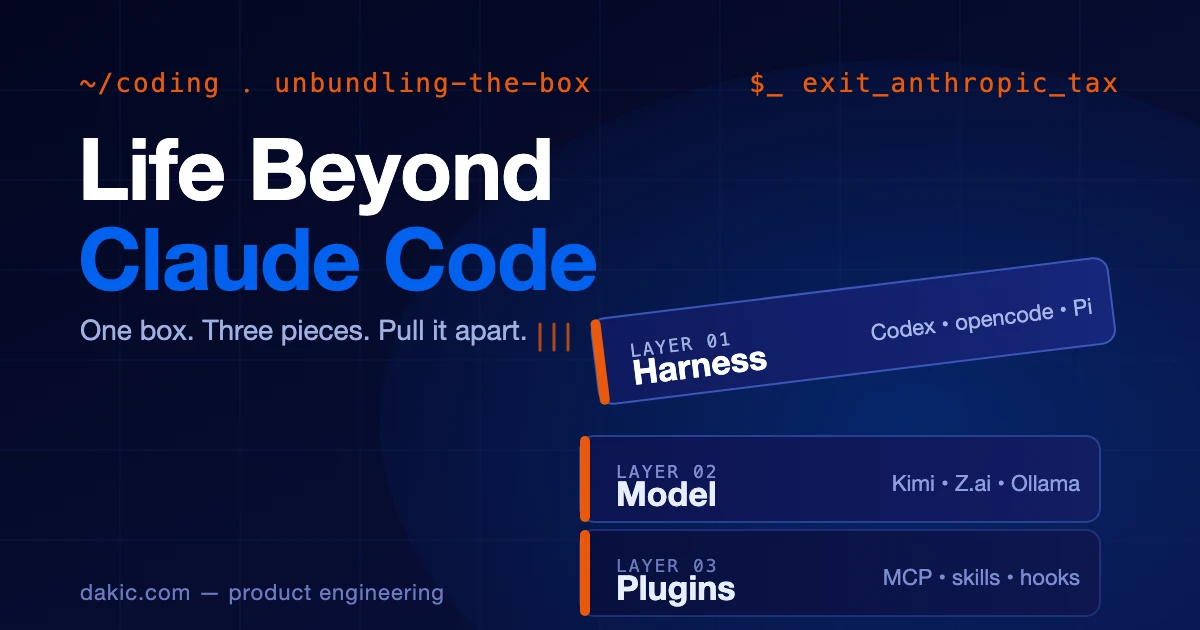
You are not stuck with Claude Code. You just think you are, because Claude Code is the only one you’ve seen. Here is the part most developers miss: Claude Code is not really one thing. It’s three things in a single box — the harness (how you talk to the agent), the model (the thing doing the thinking), and the plugins (everything the agent can touch). Sold together, that box is expensive and limiting. Pulled apart, those same three pieces cost less, do more, and let you pick the best of each. The Anthropic subscription is a tax on not knowing your options. This article is the way out.
Let me show you the three pieces, one at a time.
1. The harness: how you talk to the agent
The harness is the thing you actually run. It’s the terminal, the editor, the window where you type and the agent answers. Claude Code is a harness. So are a dozen others.
Claude Code deserves the credit it gets. It got the model right, the feel right, and the timing right. For a lot of developers it was the first time agentic coding actually worked. That’s why it became the default — and defaults are sticky.
But a closed harness comes with a cost. You’re tied to one company’s models, one company’s rate limits, and one company’s roadmap. If they raise the price, you pay. If they change the rules, you adapt.
Here’s the good news. The open-source harness movement has caught up, and in a lot of ways pulled ahead. The community ships features faster because nothing is gated, and you get to choose where your money goes.
The ones worth your time:
- Cursor — the editor-native AI harness most people have actually heard of. It’s a fork of VS Code rebuilt around the agent, so if you’re coming from VS Code it feels like home. The trade-off is the same closed-bundle problem this article is about: you’re buying the harness and the model from one company. Worth knowing, worth trying, just don’t mistake it for an exit from the box.
- Codex — a genuinely strong option that holds up as a daily driver, not just a backup.
- Open Code (opencode) — the heart of the open movement. I used it for a long stretch. It ships the kind of features the closed options take a year to match, because the community moves at community speed.
- Kilo Code — a fast open-source agent in the editor-extension family. If you live in VS Code and want model freedom without leaving your editor, start here.
- Cody and Amp — both from Sourcegraph, the code-intelligence people. Their edge is that they actually understand large codebases instead of just pattern-matching on them. Cody understands the code; Amp does something about it.
- FactoryDroid — Factory AI’s “Droids,” which automate coding, testing, and deployment tasks. Worth a look; I’ll let you explore that one on your own.
There are more — Windsurf, Continue, Cline, Roo Code, Aider, GitHub Copilot’s agent mode. The point isn’t to list them all. The point is to pick one open harness and actually learn it. That’s step one to getting out of the box.
References / go deeper:
- opencode — the open-source harness.
- Kilo Code — open-source editor agent.
- Cody & Amp (Sourcegraph) — code understanding plus an agentic companion, from the same team.
2. The model: the thing doing the thinking
This is the piece that quietly holds everyone captive. Most Claude Code users never separate the harness from the model — they assume the model is Claude Code. It isn’t. The model is a choice you make on its own, and it’s the choice that changes your bill the most.
The model landscape in 2026 is crowded, and the frontier is no longer one company. Some worth wiring into an open harness:
- Kimi (from Moonshot AI) — a subscription that changes the math on “just leave it running.” Strong coding models at a price that lets you stop watching the meter.
- Z.ai (Zhipu’s GLM models) — competitive on agentic coding tasks and worth trying in an open harness.
- MiniMax — another name in the model-provider lineup worth knowing.
Then there’s the fast inference layer — providers that host the same open models (Llama, Qwen, GLM, and friends) but run them on silicon built for speed:
- Cerebras — inference on their own wafer-scale CS-3 chips. Same open model, but the tokens come back fast enough to change how the agent feels: less waiting, more flow. When an agent can read your repo and reply in a blink, you stop babysitting it.
- Fireworks.ai — optimized serving of open models with low latency and predictable pricing. A good default when you want frontier-grade open models without frontier-grade bills or frontier-grade lag.
These two matter because speed is a feature of the model. A slightly weaker model served fast often beats a slightly stronger model served slow, because the agent’s loop tightens and you stay in flow. Wire them in through OpenRouter or directly.
Then there are the two pieces of plumbing that make all of this actually work:
- Ollama — run open models locally. Same harness, zero per-token cost, zero data leaving your machine. The catch is hardware: you need the RAM and GPU for the size of model you want. It’s perfect for private codebases, offline work, and trying models before you pay for them in the cloud.
- OpenRouter — one API, every model. It sits between your harness and the whole world of models, so you can hop from Kimi to GLM to Llama to Claude without rewriting anything. This is the piece that makes the next idea real.
Here’s that idea, and it’s the real unlock: you don’t have to use one model for everything. With an open harness and OpenRouter, you route per task. A cheap, fast model for boilerplate. A frontier model for the hard refactor. A local model via Ollama for the sensitive code. A fast-inference endpoint via Cerebras or Fireworks when latency is the bottleneck. You stop paying one company’s premium for jobs a cheaper — or faster — model could do.
That single shift — paying for the right model for the job instead of the same model for every job — is most of the savings, right there.
References / go deeper:
- Kimi / Moonshot AI — subscription + API.
- Z.ai — GLM models.
- Cerebras — fast inference on custom silicon.
- Fireworks.ai — fast, cheap serving of open models.
- Ollama — run open-source models locally, free.
- OpenRouter — one API for open and closed models; the routing layer.
- Pair any of these with opencode or Kilo Code to actually use them in a coding harness.
3. Why I landed on Pi Agent
I used Open Code for a long time. For the last five or six months, I’ve been on Pi Agent, and it stuck. Here’s why.
Pi Agent is groundbreaking because it’s simpler and lighter. That sounds like a downgrade until you live with it. The heavy harnesses add features faster than they add clarity — more menus, more modes, more things to configure before you can do the work. Pi Agent inverts that. The defaults are fast. The power features are there when you reach for them. The day-to-day friction is almost zero.
A normal session looks like this: I give it context, I delegate the work, I ship. I’m not fighting the tool. I’m not configuring it. I’m just doing the thing.
Is it the most powerful harness on paper? No. And I’d make that trade again. The tool that gets out of your way is the tool you actually use, and the tool you actually use is the one that ships.
References / go deeper:
- pi-subagents — delegation, chains, parallel runs; this is where Pi Agent’s lightness pays off.
- ast-grep and LSP navigation — so the agent actually understands your code instead of guessing.
4. The plugins: what you bolt on is what makes it powerful
This is the third piece of the box, and it’s the one that levels the field. Whatever harness you pick — Claude Code, Open Code, Pi Agent — the plugins are what turn a generic agent into your agent.
The big ones:
-
MCP servers were, for a while, the headline — and genuinely important. They connected the agent to the rest of your world: your database, your browser, your design files, your ticket tracker. The pitch was “USB-C for agents” — one standard, everything plugs in. That mattered a lot when it arrived. It matters less now, because the harnesses have absorbed most of what MCP used to be the only way to do. Still useful, still worth knowing, just no longer the magic unlock it was a year ago.
-
Custom skills and slash commands let you encode the workflows you repeat. A review-and-commit flow. A new-article scaffold. Whatever your team does ten times a week, you turn into one command. This is where a generic harness becomes yours.
A few worth knowing — these are popular open-source skill repos people genuinely love:
- Superpowers (obra) — a complete development workflow built from composable skills. Instead of jumping into code, the agent teases a spec out of you, walks you through a design, builds an implementation plan a junior could follow, then runs a subagent-driven build with real red/green TDD. The skills trigger automatically, so your agent just has Superpowers.
- gstack (Garry Tan) — a curated set of slash-command skills for plan/design/engineering review,
/ship,/qa,/retro, and a real browser skill. An opinionated whole-product workflow from someone who ships a lot, with built-in pushback against AI slop and default-looking output. - Ponytail — enforces a “laziest solution that actually works” discipline: stdlib before dependencies, one line before fifty, deletion over addition. Sounds like a joke until you watch a codebase stop accumulating speculative abstractions.
- Design skills (impeccable, ui-ux-pro-max, ckm-design) — turn the agent into a real design partner: UI review, design systems, accessibility, component specs. This is how you get a frontend that doesn’t look generated.
-
Subagents and delegation let one agent stay in control while others handle research, review, or implementation in parallel. Your main context stays clean. This is the part where lighter harnesses like Pi Agent punch above their weight.
-
LSP integration means the agent actually understands your types and errors instead of guessing at them. It reads the same diagnostics your editor does.
-
Hooks run your guardrails for you — pre-edit lint, post-edit test, auto-format. The checks happen without you remembering to run them.
-
Persistent memory lets project facts survive the session, through an
AGENTS.mdfile or a memory tool, so the agent stops forgetting what your project is.
The point of all of this: the plugins are portable. The skill you write for one harness is knowledge that follows you to the next. The model you route to is a setting. The harness is just the box.
References / go deeper (real tools, not a wish list):
- Code intelligence: ast-grep, tree-sitter rules, LSP — structural search and diagnostics the agent can act on.
- Browser and web: browser-harness, playwright-cli — drive a real browser from inside the agent.
- Payments and infra: stripe-best-practices, wrangler, Railway — wire the agent to the services you actually deploy.
- Workflow and review: review-and-commit, code-review — automated review, lint, fix, commit.
- Research and reach: agent-reach, postiz — research the web, schedule social.
5. How to use any of them well
Tools change. Habits transfer. This is the section that stays useful when every specific name in this article has been replaced twice over.
- Feed it context first. An
AGENTS.md, your architecture notes, your conventions. The agent isn’t reading your mind; it’s reading your repo. (I wrote a whole piece on this — Prepare Your Codebase for AI Agents — and it’s the prerequisite to everything here.) - Match the tool to the job. Autocomplete for one line. A subagent for a refactor. A headless CLI for the CI pipeline. Stop using a sledgehammer to hang a picture.
- Keep the guardrails honest. Tests, lint, formatting, CI. The agent amplifies whatever it touches — including your mess.
- Review like a human. Never merge output you didn’t read. Diff, don’t trust.
- Watch the bill and the tokens. Context windows are a budget, not a firehose. Route to cheaper models where the job lets you.
- Compound the tools. MCP plus subagents plus skills is where the real multiplier lives. Any one of them is nice. All three is a different way of working.
A quick-start: “I only use Claude Code — where do I begin?”
A ladder for getting out of the box without upending your week:
- Add one MCP server to your current setup. Lowest risk, highest “oh, that’s cool.”
- Try one open harness on a side project. Open Code or Kilo Code are the natural first stops.
- Point it at a second model. Wire in Kimi or Z.ai, or pull something through OpenRouter, and feel the difference routing makes.
- Write one custom skill for a task you repeat. Only then consider switching your daily driver.
FAQ
Is Claude Code actually worse than the alternatives? No. It’s one good option among several. The problem isn’t quality — it’s that it’s sold as the only option.
Do I really need to think about the model separately from the harness? Yes. That separation is the whole unlock. One provider for everything is the expensive default.
What about security with MCP and third-party plugins? Scoped tokens. Read-first permissions. Audit logs. Same rules you’d apply to any third-party integration — agents aren’t special.
Won’t this all change in six months? Yes — that’s exactly why the habits matter more than the names. The three-layer model will outlive every tool listed here.
The bottom line
You were paying the Anthropic tax because you didn’t know your options. Now you do.
Claude Code is a box with three things inside: the harness, the model, the plugins. Take the box apart and you keep the power, get any model you want, and pay a lot less. That’s not rebellion. It’s just a better deal.
Claude Code popularized this category. The open movement keeps raising the bar. The model layer broke the provider monopoly. And tools like Pi Agent show that “lighter” can be a feature, not a compromise.
At Dakic, we help teams pick the right harness, wire up the right models, and skip the bundle tax. Talk to us — and see for yourself.